Treffe eine Alternative zu 3D Filament Profiles

Wie schneidet sich SimplyPrint im Vergleich zu 3D Filament Profiles ab? Was ist die beste Cloud-Plattform für 3D-Druck? Entdecke, warum SimplyPrint vielleicht genau das ist, das dein Drucker vermisst!

Loslegen, für immer kostenlos Jump to the comparison table

Suchst du nach 3D Filament Profiles-Alternativen?

3D Filament Profiles is a genuinely impressive thing: a huge, free, community-built filament catalogue, self-branded the world's largest, plus a personal spool inventory, HueForge-focused colour tooling and a deep hardware reference. If you want the biggest browsable list of filaments to look things up in, and you're happy to keep your own inventory by hand, it's a great free resource.

But it doesn't touch your printer. To keep a spool accurate you weigh it or log each print yourself, every time. SimplyPrint's filament manager works the other way around: it's connected to your printers, reads the G-code of every print, and deducts filament from the assigned spool on its own, with no weighing and no manual subtracting. Here's a fair, side-by-side look, first purely as a filament manager, then as the whole platform.

SimplyPrint filament manager

There's a lot more to the SimplyPrint filament manager

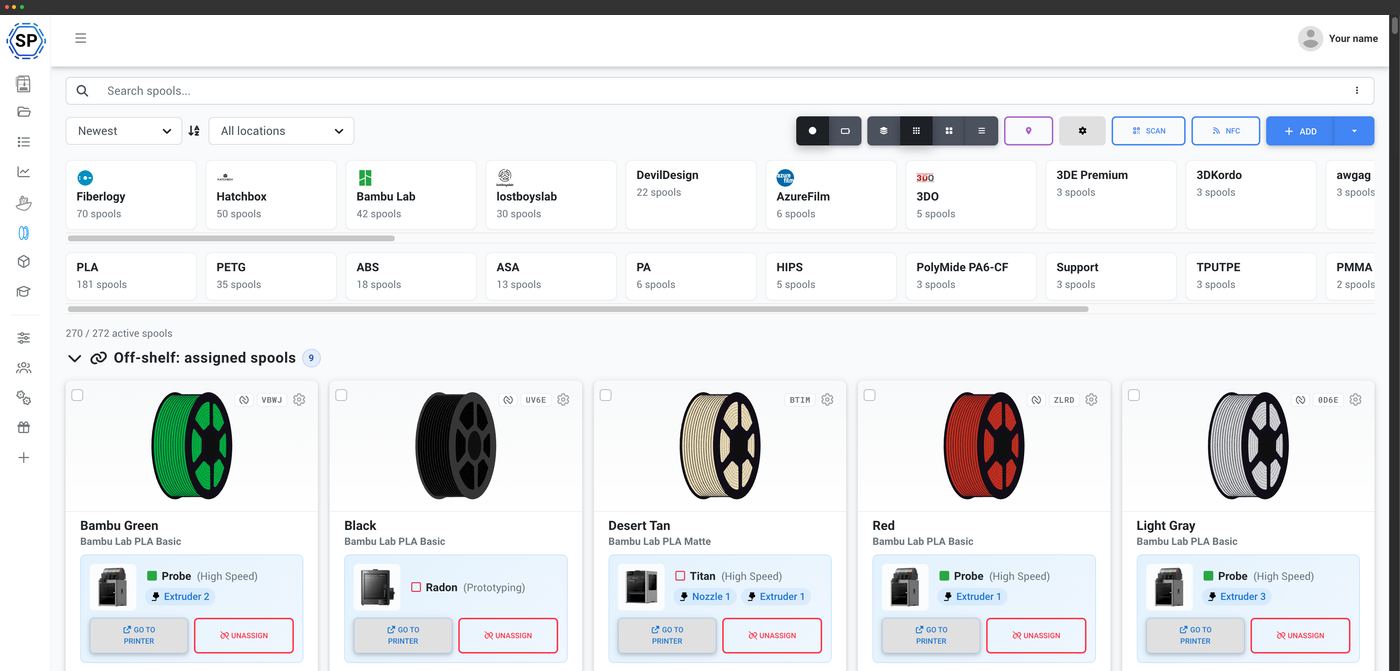
Automatic usage tracking, NFC across every standard, Bambu & Creality AMS auto-import, direct Dymo & Zebra label printing, drying, storage locations, a mobile app and the Open Filament Database. See it all, with screenshots, on one page.

Explore the filament manager
The SimplyPrint filament manager

Compare 3D Filament Profiles vs SimplyPrint:

Das Fazit

3D Filament Profiles is a free, community-driven filament catalogue and a manual personal inventory, with strong HueForge colour tooling and a broad hardware reference. It's a fine fit if you mainly want a place to browse filaments and keep your own spool list by hand, and you don't need your tool to talk to the printer.

SimplyPrint is a connected filament manager: it reads the G-code of every print and deducts filament automatically, so there's nothing to weigh or subtract, across any printer brand. It adds native NFC read and write, Bambu and Creality AMS auto-import, native iOS and Android apps, direct Dymo and Zebra label printing, and the open, MIT-licensed Open Filament Database (151 brands), which you can download, embed and edit in the browser. And the filament manager is free on every plan. If you want the biggest catalogue to browse and don't mind logging usage yourself, that's 3D Filament Profiles; if you want tracking that just happens off your printer, that's SimplyPrint.

Comparing purely as a filament manager, the deep, head-to-head view.

A filament manager that tracks usage for you

This is the heart of it. 3D Filament Profiles doesn't connect to your printers, so keeping a spool accurate means weighing it or logging each print yourself. SimplyPrint is connected to them, so your inventory stays right on its own.

Automatic usage tracking
SimplyPrint
We read the G-code of every print on a connected printer, convert it to grams and deduct it from the assigned spool when the print ends, automatically. No weighing, no logging, no spreadsheet.
3D Filament Profiles
There's no printer connection. Their own docs describe updating spool weights after each print: you weigh the spool, or use the "My Print" logger to do the maths, but you enter every print yourself.
AMS, NFC & mobile
SimplyPrint
Drop a tagged spool into a Bambu Lab AMS (or a Creality CFS or Anycubic ACE) and we auto-create the spool, assign it to the right slot and sync the AMS-measured weight, plus native NFC read and write and native iOS and Android apps.
3D Filament Profiles
No AMS connection (their AMS page is a hardware spec table, not a live link), and no NFC anywhere, identification is printed QR and barcode only. There's no native app either; it's a responsive web app and PWA.
Labels & scanning
SimplyPrint
Direct label printing to Dymo and Zebra thermal printers, plus QR and barcode scanning from your phone, all tied to the spool the printer is actually using.
3D Filament Profiles
They do print labels, to Phomemo, Niimbot and Brother, and scan QR and UPC barcodes from a phone or Bluetooth scanner. It's a real strength; the difference is the printer brands we target and that our scanning feeds a connected inventory rather than a hand-kept one.
The core difference is simple: SimplyPrint is connected to the printer, so tracking happens by itself; with 3D Filament Profiles you keep the inventory accurate by weighing and logging by hand.

A bigger catalogue, or an open one

Credit where it's due: 3D Filament Profiles has a far larger filament catalogue than we do, and it grows daily. Our database is a different proposition: smaller, but genuinely open, downloadable and wired into tracking.

The catalogue
SimplyPrint
The Open Filament Database, MIT-licensed and stewarded by SimplyPrint, with 151 brands, that you can download as JSON or CSV, embed in your own tools, and edit in a no-code web editor in minutes.
3D Filament Profiles
A much larger crowdsourced catalogue, genuinely a strength, but proprietary and hosted-only: there's no licence, no official bulk export and no public API, so you can browse and contribute through their UI but you can't take the data and own it.
Where the data goes
SimplyPrint
The same open data backs your slicing profiles and the automatic deduction, so adding a spool and tracking it are one connected flow on a printer we're already talking to.
3D Filament Profiles
The catalogue fills in spool details beautifully, but consumption still has to be entered by hand, because nothing is connected to the printer.
If you simply want the biggest list of filaments to browse, theirs is larger. If you want data you can download, embed and edit in the browser, wired straight into automatic tracking, that's the Open Filament Database.

Where 3D Filament Profiles is the better pick

It's a well-made, genuinely useful resource, and for some people it's the right call. Credit where it's due:

The biggest catalogue & colour tooling
SimplyPrint
We focus on a connected filament manager and an open database, not on being the largest browsable catalogue or a HueForge colour workbench.
3D Filament Profiles
A far bigger filament catalogue plus deep HueForge-focused colour tooling, community-voted TD (Transmission Distance) values, colour cards and swatch matching, a niche we don't target as deeply.
A free reference and manual inventory
SimplyPrint
Our filament manager is free on every plan, but it's part of a connected platform, not a standalone catalogue you browse without an account.
3D Filament Profiles
Completely free, no paywall, with a broad hardware reference (printers, AMS units, build plates, dryers) and live vendor pricing, and you can browse most of it without even signing in.
If what you want is the largest filament catalogue to look things up in, strong HueForge colour tooling, and a free inventory you're happy to keep by hand, 3D Filament Profiles is a fine choice, and it's free. If you'd rather the tracking just happen off your printer, with NFC, AMS and native apps, that's SimplyPrint.
Das Fazit

3D Filament Profiles does two jobs, a filament catalogue and a manual inventory, and does the catalogue part very well. SimplyPrint includes a connected filament manager and surrounds it with the rest of a print operation: a print queue, a full cloud slicer, AI failure and bed detection, a maintenance system, teams and permissions, native mobile apps and more, in one hosted platform that's free to start. In the table below, their column is the catalogue and manual inventory; ours is the whole platform.

The same filament comparison, plus everything else SimplyPrint does that a catalogue and manual log doesn't.

A filament manager that tracks usage for you

This is the heart of it. 3D Filament Profiles doesn't connect to your printers, so keeping a spool accurate means weighing it or logging each print yourself. SimplyPrint is connected to them, so your inventory stays right on its own.

Automatic usage tracking
SimplyPrint
We read the G-code of every print on a connected printer, convert it to grams and deduct it from the assigned spool when the print ends, automatically. No weighing, no logging, no spreadsheet.
3D Filament Profiles
There's no printer connection. Their own docs describe updating spool weights after each print: you weigh the spool, or use the "My Print" logger to do the maths, but you enter every print yourself.
AMS, NFC & mobile
SimplyPrint
Drop a tagged spool into a Bambu Lab AMS (or a Creality CFS or Anycubic ACE) and we auto-create the spool, assign it to the right slot and sync the AMS-measured weight, plus native NFC read and write and native iOS and Android apps.
3D Filament Profiles
No AMS connection (their AMS page is a hardware spec table, not a live link), and no NFC anywhere, identification is printed QR and barcode only. There's no native app either; it's a responsive web app and PWA.
Labels & scanning
SimplyPrint
Direct label printing to Dymo and Zebra thermal printers, plus QR and barcode scanning from your phone, all tied to the spool the printer is actually using.
3D Filament Profiles
They do print labels, to Phomemo, Niimbot and Brother, and scan QR and UPC barcodes from a phone or Bluetooth scanner. It's a real strength; the difference is the printer brands we target and that our scanning feeds a connected inventory rather than a hand-kept one.
The core difference is simple: SimplyPrint is connected to the printer, so tracking happens by itself; with 3D Filament Profiles you keep the inventory accurate by weighing and logging by hand.

A bigger catalogue, or an open one

Credit where it's due: 3D Filament Profiles has a far larger filament catalogue than we do, and it grows daily. Our database is a different proposition: smaller, but genuinely open, downloadable and wired into tracking.

The catalogue
SimplyPrint
The Open Filament Database, MIT-licensed and stewarded by SimplyPrint, with 151 brands, that you can download as JSON or CSV, embed in your own tools, and edit in a no-code web editor in minutes.
3D Filament Profiles
A much larger crowdsourced catalogue, genuinely a strength, but proprietary and hosted-only: there's no licence, no official bulk export and no public API, so you can browse and contribute through their UI but you can't take the data and own it.
Where the data goes
SimplyPrint
The same open data backs your slicing profiles and the automatic deduction, so adding a spool and tracking it are one connected flow on a printer we're already talking to.
3D Filament Profiles
The catalogue fills in spool details beautifully, but consumption still has to be entered by hand, because nothing is connected to the printer.
If you simply want the biggest list of filaments to browse, theirs is larger. If you want data you can download, embed and edit in the browser, wired straight into automatic tracking, that's the Open Filament Database.

Where 3D Filament Profiles is the better pick

It's a well-made, genuinely useful resource, and for some people it's the right call. Credit where it's due:

The biggest catalogue & colour tooling
SimplyPrint
We focus on a connected filament manager and an open database, not on being the largest browsable catalogue or a HueForge colour workbench.
3D Filament Profiles
A far bigger filament catalogue plus deep HueForge-focused colour tooling, community-voted TD (Transmission Distance) values, colour cards and swatch matching, a niche we don't target as deeply.
A free reference and manual inventory
SimplyPrint
Our filament manager is free on every plan, but it's part of a connected platform, not a standalone catalogue you browse without an account.
3D Filament Profiles
Completely free, no paywall, with a broad hardware reference (printers, AMS units, build plates, dryers) and live vendor pricing, and you can browse most of it without even signing in.
If what you want is the largest filament catalogue to look things up in, strong HueForge colour tooling, and a free inventory you're happy to keep by hand, 3D Filament Profiles is a fine choice, and it's free. If you'd rather the tracking just happen off your printer, with NFC, AMS and native apps, that's SimplyPrint.
Join 95.000+ print farms & hobbyists
who use SimplyPrint
Loslegen

Für immer kostenlos. Keine Kreditkarte nötig.

Our users love us. Rated Excellent on Trustpilot.

4.7 Trustpilot-Bewertung

3D Filament Profiles und SimplyPrint im Vergleich

Nothing is black-and-white, and there are always pros and cons to consider when choosing a 3D printing cloud solution!
And we're not here to simply tell you, that SimplyPrint is the best - we want you to make an informed decision, and of course there are pros of using 3D Filament Profiles as well!

Vorteile von 3D Filament Profiles

3D Filament Profiles has real strengths, and they're worth being honest about:

  • A huge, fast-growing catalogue: a large community-built filament database, self-branded the world's largest, with thousands of filaments across hundreds of brands and growing daily.
  • Strong colour & HueForge tooling: community-voted TD (Transmission Distance) values, hex and RGB matching, colour cards and a swatch system, a niche it serves better than most.
  • A broad hardware reference: spec catalogues for printers, AMS units, build plates and dryers, with verified-versus-community status and live vendor pricing.
  • Genuinely free and community-driven: no paywall, browsable without an account, and easy to contribute to through the UI, with an active Discord, Reddit and GitHub community.
  • It does print labels and scan codes: direct thermal printing to Phomemo, Niimbot and Brother, plus QR and UPC barcode scanning from a phone or Bluetooth scanner.

Nachteile der Verwendung von 3D Filament Profiles

Where 3D Filament Profiles falls short if you want tracking that just happens:

  • It isn't connected to your printers: it never measures usage itself. To keep a spool accurate you weigh it or log each print by hand; there's no G-code deduction and no live link to the printer.
  • No NFC, no AMS link and no native app: there's no NFC anywhere, the AMS pages are a hardware spec reference rather than a live integration, and it's a responsive web app and PWA with no native iOS or Android app.
  • The data is hosted-only: your inventory lives in their cloud. You can export your own spools, but the catalogue is proprietary, with no licence, official bulk export or public API, so you can't own or run the platform yourself.
  • Fixed-schema fields, not arbitrary ones: per-spool settings like nozzle and bed temperature and notes are built in, but you can't define your own free-form custom fields.

3D Filament Profiles vs. SimplyPrint

Seite-an-Seite-Vergleich der Details und Funktionen von 3D Filament Profiles und SimplyPrint

3D Filament Profiles logo SimplyPrint logo
Filament management
Free to use
Open-source / self-hostable ?
Filament database ? ~29,000 filaments, 960+ brands (self-branded 'world's largest') Open Filament Database
Open, community-built database ?
Add filament without code or GitHub ?
Connects directly to your printer ?
Automatic usage tracking (no manual subtracting) ? Manual (weigh or log each print)
AMS auto-import (Bambu / Creality / Anycubic) ? Bambu, Creality, Anycubic + more
Read filament NFC tags
Write filament NFC tags
Label printing (direct to Dymo / Zebra) Dymo & Zebra
Barcode / QR scanning
Drying tracking
Storage locations Flat 'My Locations' + QR (nesting not documented)
Cost & spend tracking
Custom fields Fixed-schema settings + notes
Mobile app (iOS & Android)
Multi-user / team access
Import your existing spools ?
Developer API for filament data ?
Vergleichen Mehr erfahren Mehr erfahren
3D Filament Profiles logo SimplyPrint logo
Filament management
Free to use
Open-source / self-hostable ?
Filament database ? ~29,000 filaments, 960+ brands (self-branded 'world's largest') Open Filament Database
Open, community-built database ?
Add filament without code or GitHub ?
Connects directly to your printer ?
Automatic usage tracking (no manual subtracting) ? Manual (weigh or log each print)
AMS auto-import (Bambu / Creality / Anycubic) ? Bambu, Creality, Anycubic + more
Read filament NFC tags
Write filament NFC tags
Label printing (direct to Dymo / Zebra) Dymo & Zebra
Barcode / QR scanning
Drying tracking
Storage locations Flat 'My Locations' + QR (nesting not documented)
Cost & spend tracking
Custom fields Fixed-schema settings + notes
Mobile app (iOS & Android)
Multi-user / team access
Import your existing spools ?
Developer API for filament data ?
Allgemein
Hat kostenlosen Plan
Free printers 2
Max. Kosten Free Free, or from $4/printer/mo
Kostenloser Cloud-Speicher 1GB
Nutzungsbasierte Kosten
Unbegrenztes Drucken
Unterstützt alle Drucker
Funktionen
Fernzugriff
Kennt deinen Drucker
Cloud-Dateien
Druckwarteschlange
Live-Stream
Gcode-Analyse
KI-Fehlererkennung
AI Bed Check (is the bed clear?)
AutoPrint / Fortlaufendes Drucken
Maintenance & servicing system
Custom fields
Staggered Start (for power draw)
Print-Job-Verlauf
Aus der Ferne drucken
Integrierter Slicer
Mehrere Drucker freundlich
Multiprint
Multi-Stream
Statistiken
API
Slicer-Smart-Rotation
Smarter Filamentwechsel
Bettnivellierungshilfe
Organisation
Mehrere Benutzer
Nutzergruppen / Ränge
Nutzerberechtigungen
Schulplan
Geteilte Dateien & Ordner
Geteilte Slicer-Profile
Hub
Eigene Domains
SSO (Single Sign-On)
Benachrichtigungen
E-Mail-Benachrichtigungen
Push-Benachrichtigungen (mobil / App)
SMS-Benachrichtigungen
Apps
Android-App
iOS-App
"PWA" (installierbare Web-App)
Security & privacy
2-Faktor-Authentifizierung für das Konto
Privacy-minded analytics & data-gathering ?
Support
Live-Chat-Support
Telefonsupport
E-Mail-Support
Firmware- & Gateway-Unterstützung
OctoPrint-Installation
Native Moonraker-Unterstützung
Mainsail-Installation
Fluidd-Installation
Klipper-Unterstützung
Duet3D-Integration
Direkter Prusa-Support (MK4, XL und neuer / neue Mainboards)
Direkte Bambu-Lab-Druckerintegration
Unterstützung für individuelle Integrationen
Enterprise & Partner
OEM
Partnerprogramm (Wiederverkäufer/Distributor)
Affiliate-Programm
On-prem / self-hosting ? Contact us
Vergleichen Mehr erfahren Mehr erfahren

Kontaktiere uns, wenn du glaubst, dass wir einen Fehler in unserem Vergleich gemacht haben!

3D Filament Profiles vs. SimplyPrint: häufig gestellte Fragen

Is SimplyPrint or 3D Filament Profiles better for filament tracking?

It depends on what you want. 3D Filament Profiles is the better fit if you mainly want the biggest browsable filament catalogue, HueForge colour tooling and a free inventory you're happy to keep by hand. SimplyPrint is the better fit if you want tracking that happens automatically: it connects to your printers, reads the G-code of each print and deducts filament on its own, across any printer brand, with native NFC, Bambu and Creality AMS auto-import, native mobile apps and the open, downloadable Open Filament Database, free on every plan.

Does 3D Filament Profiles track filament usage automatically?

No. It doesn't connect to your printers, so keeping a spool accurate means weighing it or logging each print yourself; their own docs describe updating spool weights after each print, with the "My Print" tool doing the maths once you enter the figures. SimplyPrint reads the G-code of every print on a connected printer and deducts usage automatically, with nothing to weigh or subtract.

Does 3D Filament Profiles have a bigger filament database than SimplyPrint?

Yes, its catalogue is much larger, self-branded the world's largest, and it grows daily; that's a genuine strength. The Open Filament Database is a different proposition: 151 brands, MIT-licensed, and you can download it as JSON or CSV, embed it in your own tools and edit it in a no-code web editor. 3D Filament Profiles' catalogue is proprietary and hosted-only, with no licence or official bulk export, and the SimplyPrint database is wired directly into automatic, printer-connected tracking.

Can I import my 3D Filament Profiles spools into SimplyPrint?

Yes. SimplyPrint lists 3D Filament Profiles as a supported import source, and you can export your own spools from it (as CSV or JSON), so moving your inventory over is straightforward, with brands matched against the Open Filament Database as they import.

Does 3D Filament Profiles work with the Bambu Lab AMS or NFC tags?

No. There's no NFC anywhere, identification is printed QR and barcode only, and its AMS pages are a hardware spec reference rather than a live AMS integration. SimplyPrint reads Bambu AMS tags to auto-create and auto-assign spools and sync their weight, and reads and writes NFC across Bambu, Creality CFS, Prusa OpenPrintTag, OpenSpool and OpenTag, from your phone, browser or a USB reader.

Does 3D Filament Profiles print labels and scan barcodes?

Yes, both, and they work well: it prints labels directly to Phomemo, Niimbot and Brother thermal printers, and scans QR and UPC barcodes from a phone camera or a Bluetooth scanner. SimplyPrint targets Dymo and Zebra label printers and ties scanning to the spool the connected printer is actually using, plus colour standards like RAL and NCS, so the difference is the printer brands and the connected workflow, not whether labels and scanning exist.

Do I have to keep my filament inventory by hand with these tools?

With 3D Filament Profiles, yes: because nothing is connected to the printer, you weigh each spool or log each print to keep it accurate. SimplyPrint keeps it accurate for you, by reading the G-code of every print on a connected printer and deducting filament from the assigned spool automatically, so there's no manual subtracting to do.

Conclusion
Why SimplyPrint is the Top 3D Filament Profiles Alternative

Wir haben SimplyPrint entwickelt, weil nichts anderes auf dem Markt so richtig zu unseren Anforderungen passte. Wir wollten eine Plattform, die einfach zu bedienen ist, aber trotzdem alle Funktionen bietet, die wir brauchten. Wir wollten eine funktionsreiche, intuitive und einfach zu bedienende Plattform mit einer großartigen Nutzererfahrung und echter Innovation im Bereich der 3D-Druckmanagement-Software.

Abschließend glauben wir, dass die SimplyPrint-Plattform eine großartige 3D Filament Profiles Alternative ist!

Loslegen, für immer kostenlos

On this page