
Power-safe startup for 3D print farms

Stop tripping breakers when starting your 3D printers

Heated beds and hotends are by far the biggest power draw on a 3D printer, and they peak during preheat. Preheating 20 printers at the same time can pull more amps than your fuse panel can take - and one tripped breaker takes the whole farm offline. Staggered Start caps how many printers can preheat at once, so your fleet starts safely on the wiring you've already got.

Get started for free More info & how-to
Staggered Start

Who needs Staggered Start?

Anyone running multiple 3D printers on a domestic or office circuit: print farms in basements, garages, offices and warehouses, university and school labs sharing a wall outlet, and makerspaces where the breaker keeps tripping when class starts. If you've ever blown a fuse preheating a row of printers, this is built for you.

Preheating is when 3D printers draw the most power

A 3D printer's heated bed and hotend account for the vast majority of its power consumption - and they spike during preheat, then settle once they hit temperature. That's why you can usually run a farm fine 24/7 but trip the breaker the moment every printer tries to preheat at once.

Staggered Start solves this by limiting how many printers can be preheating simultaneously. Once a printer reaches temperature and starts printing, the next pending printer is released to begin preheating. The rest wait their turn in a Pending start state.

Set the limit once, start your whole farm in one click - safely

Say your farm has 20 printers, but your circuit can only handle 3 printers heating at the same time. You set the Staggered Start group's heating limit to 3. Then you use 1-Click Print, AutoPrint, or just hit start on every printer at once - the platform takes care of the rest:

  • 3 printers begin heating. The other 17 sit in a "Pending start" state.
  • As soon as one printer finishes heating and starts laying down filament, the next pending printer is released to begin heating.
  • The cycle continues until every print is running.

You can cancel a pending print at any time - the next one in line takes its place automatically.

Feature image

See your power budget in action

Pick your circuit, then start the fleet. Flip Staggered Start off mid-run to see why the feature exists - and flip it on if you'd rather your breakers stayed in.

Warehouse #1
0 heating 0 / 40 done
+2 0.4 Black
Sigma
+2 0.4 White
Louise
+2 0.4 Red
Solstice
+2 0.4 Blue
Quark
+2 0.6 Green
XJ
+2 0.4 Yellow
Vicki
+2 0.4 Pink
Meteor
+2 0.2 Orange
Vector
+2 0.4 Purple
Cyber
+2 0.8 Gray
Rosie
+2 0.4 Black
NovaX
+2 0.4 White
Helix
+2 0.4 Red
Neon
+2 0.4 Blue
Blazer
+2 0.6 Green
Marvin
+2 0.4 Yellow
Synth
+2 0.4 Pink
Louise
+2 0.2 Orange
Rosie
+2 0.4 Purple
AuroraX
+2 0.8 Gray
Optimus
+2 0.4 Black
Quark
+2 0.4 White
Chewbacca
+2 0.4 Red
Module
+2 0.4 Blue
Bender
+2 0.6 Green
Spark
+2 0.4 Yellow
Quark
+2 0.4 Pink
Photon
+2 0.2 Orange
Circuitry
+2 0.4 Purple
Glitch
+2 0.8 Gray
Omega
+2 0.4 Black
Bender
+2 0.4 White
Nova
+2 0.4 Red
Meteor
+2 0.4 Blue
Mercury
+2 0.6 Green
Proton
+2 0.4 Yellow
Pixel
+2 0.4 Pink
Comet
+2 0.2 Orange
Aurora
+2 0.4 Purple
Echo
+2 0.8 Gray
Spark
Space play/pause · R reset
Feature image

Not sure where to set the limit? Use the heating limit calculator

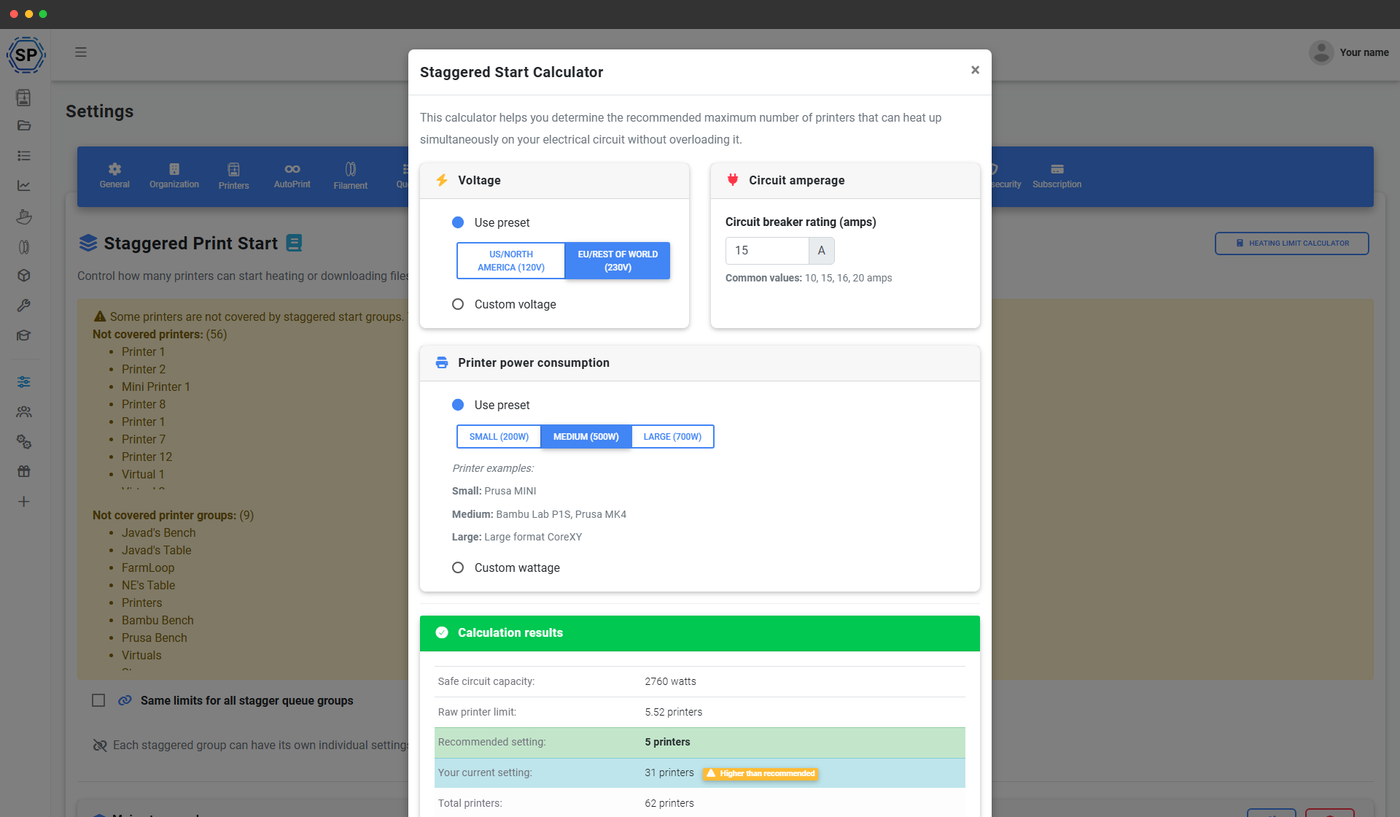
We've built a free calculator to give you a starting number. Tell it your region (US/North America or EU/rest of world), your circuit breaker rating in amps, and whether you're running small, medium or large printers - and it'll suggest a safe heating limit.

The calculator is a guide, not a guarantee. Real-world numbers depend on your wiring, filament type (different materials need different bed and nozzle temperatures), and what else is plugged into the circuit. The reliable approach: start with the calculator's number, try heating 5 at once, drop to 4 if it trips, drop to 3 if it still trips. Once you stop tripping, you've found your limit.

Setting up Staggered Start in 4 steps

Configuration takes about two minutes. Open Settings > Staggered Start, decide your limits, pick which printers it covers, save.

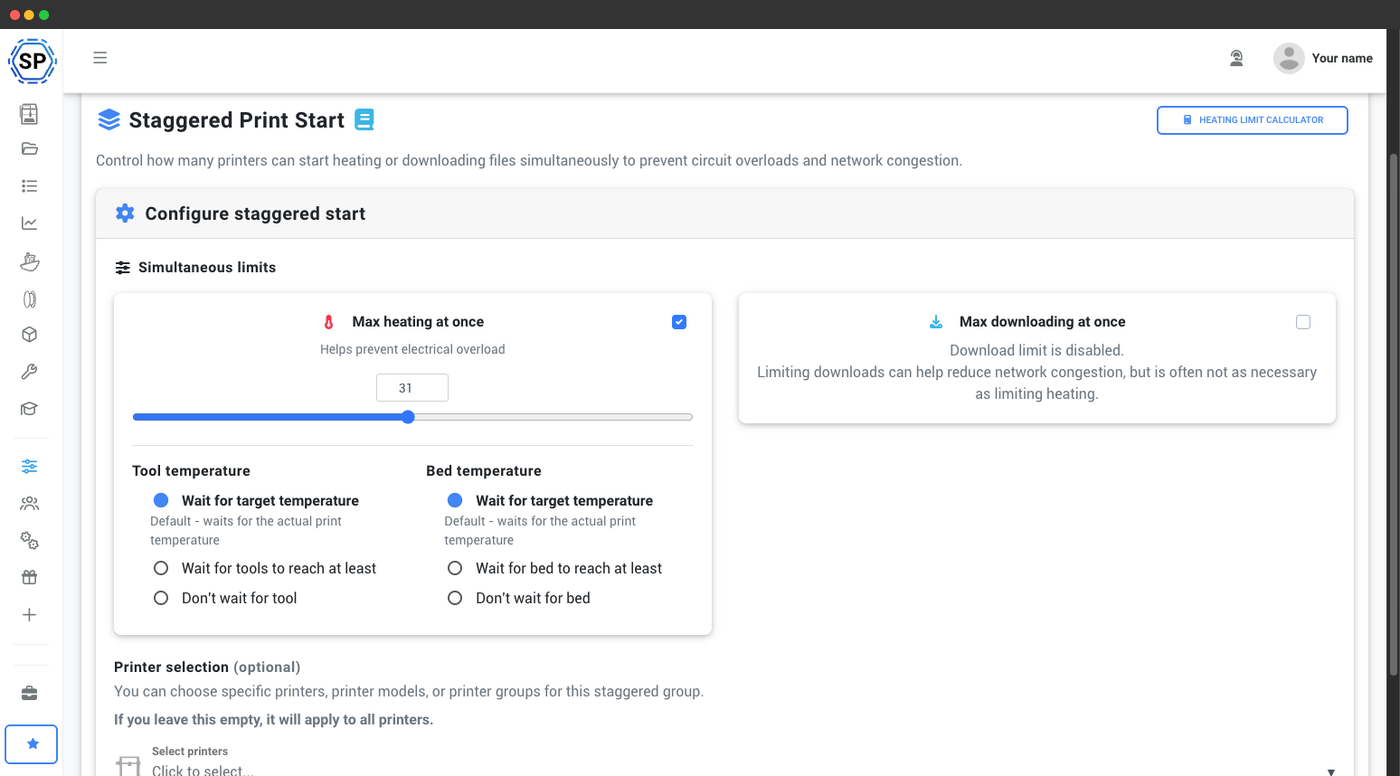
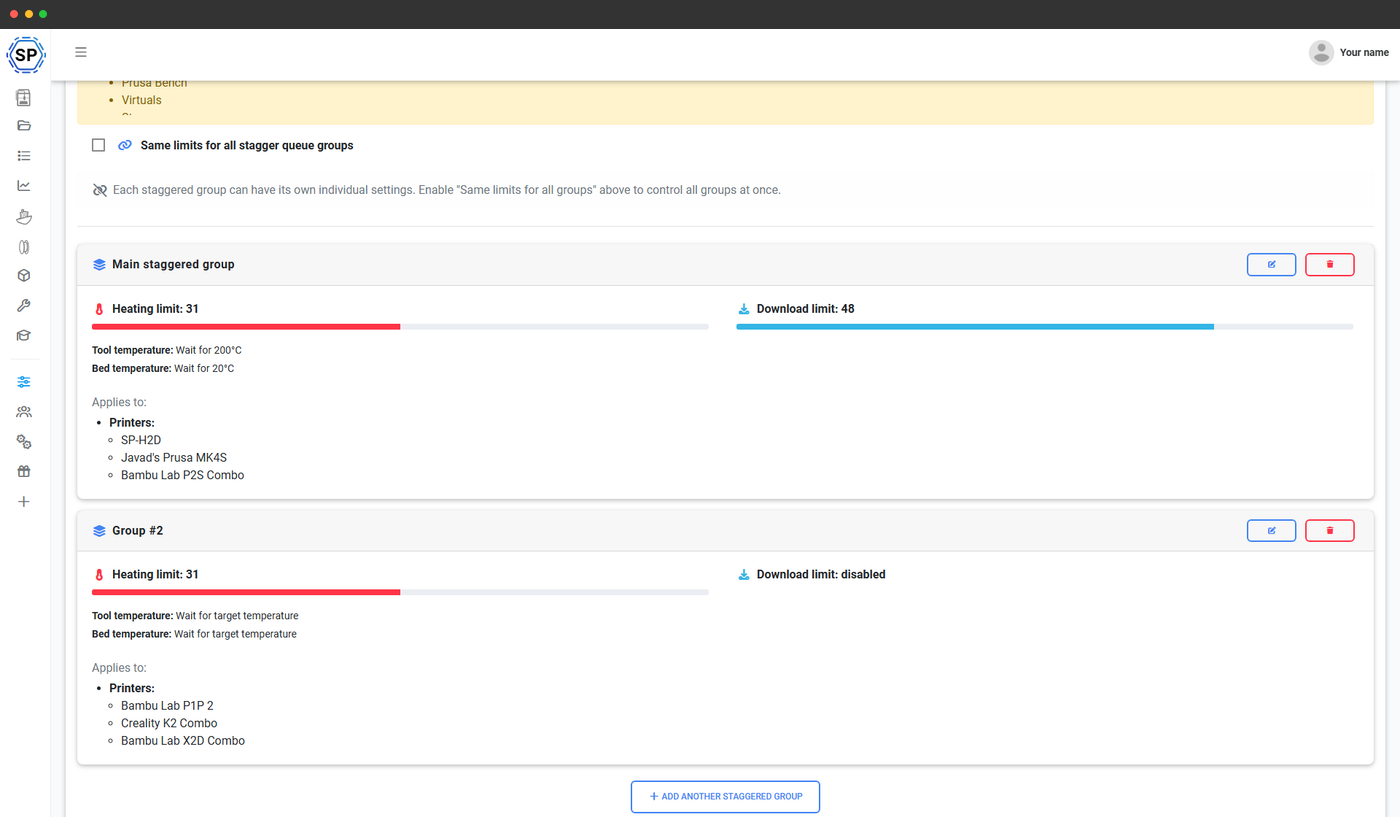
1. Set your heating limit

Drag the slider to the number of printers your circuit can safely heat at once.

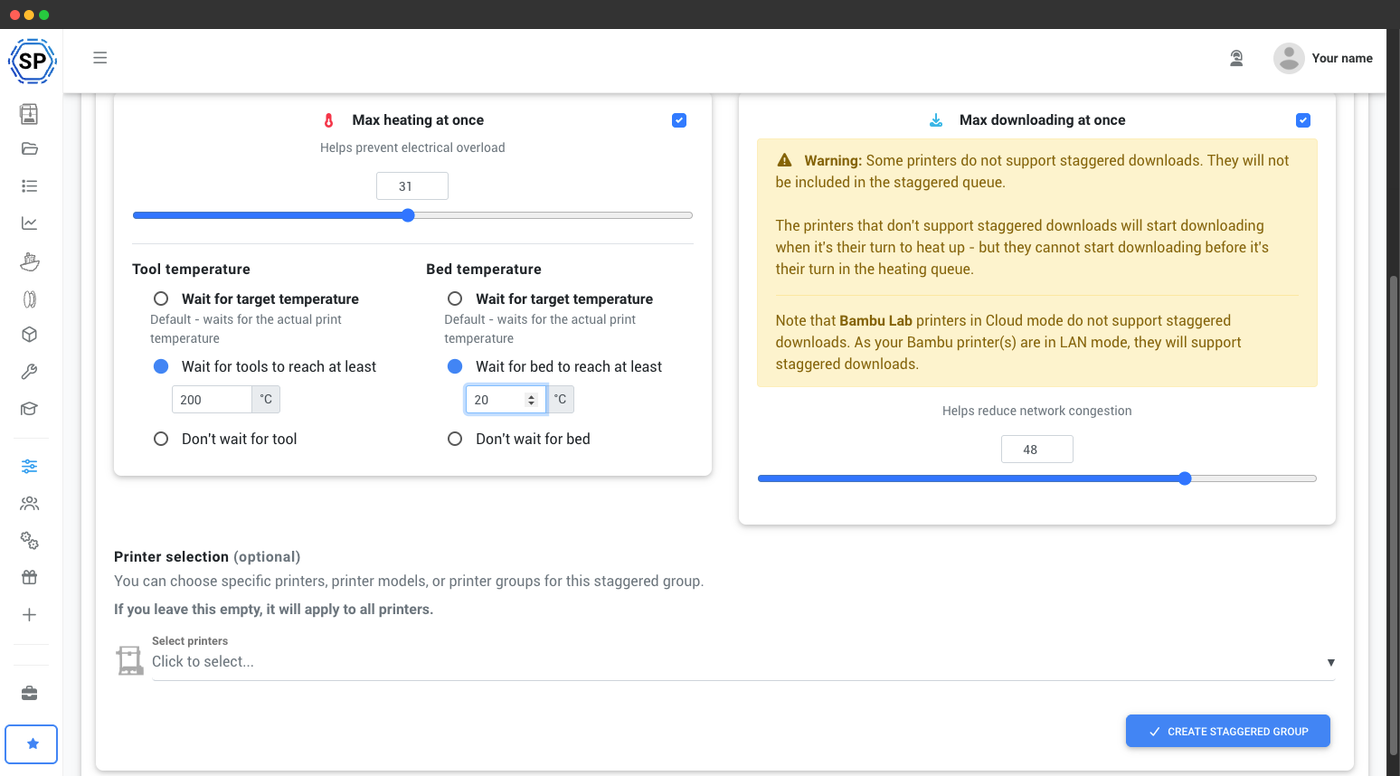
2. Tune temperature thresholds

Lower the wait threshold (e.g. 200°C tool, 20°C bed) to move the queue along faster.

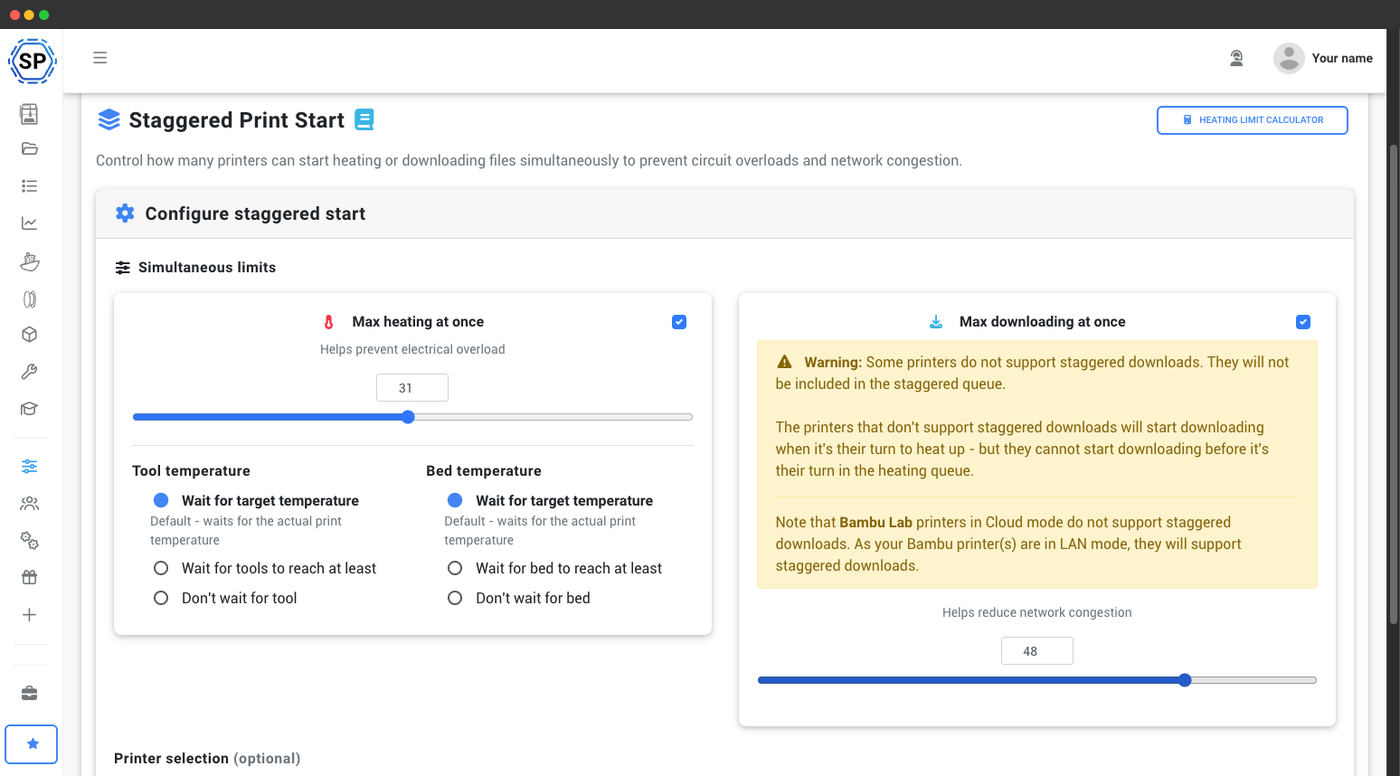
3. Optional: cap downloads too

Limit concurrent G-code downloads if your network can't handle 20 at once.

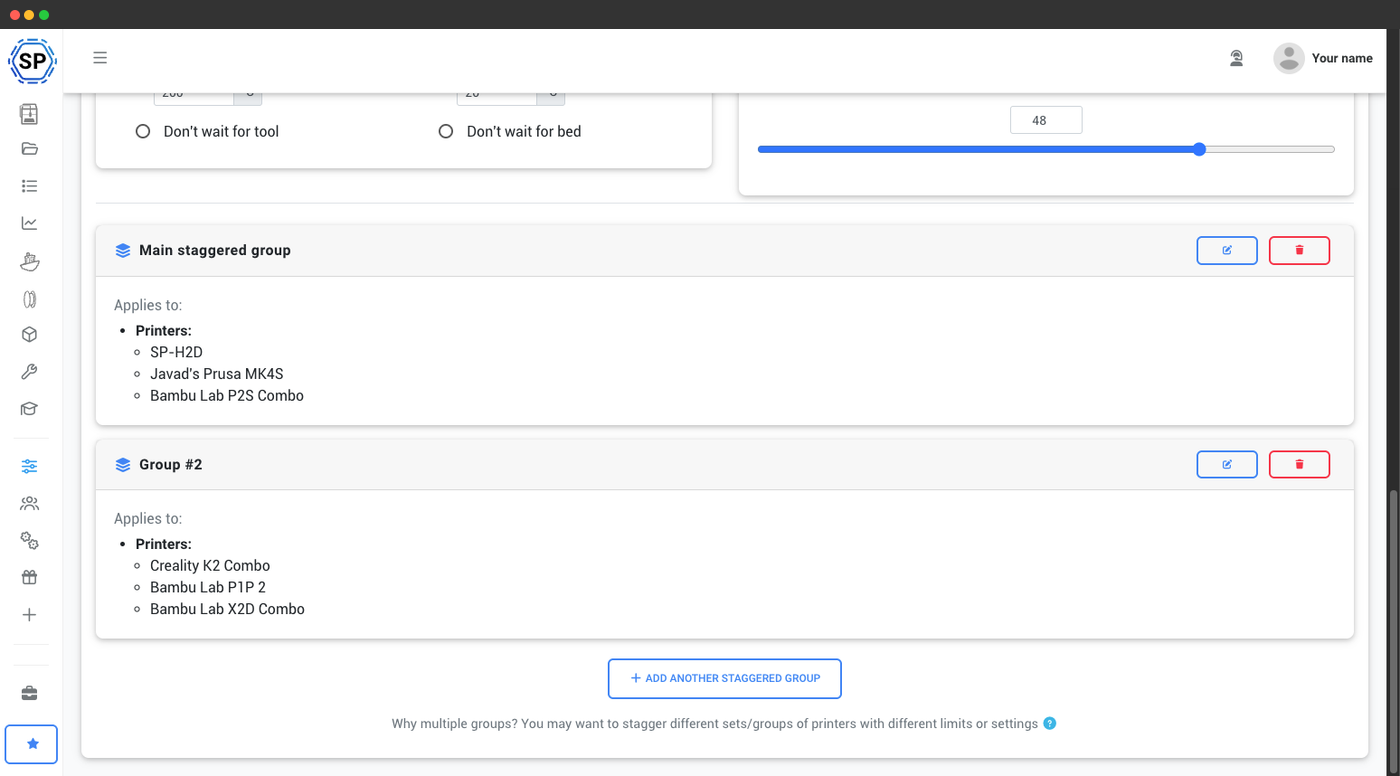
4. Choose which printers it applies to

All printers by default - or pick specific ones, models or groups.

frame frame frame frame
Feature image

Multiple stagger groups for multi-room and multi-location farms

If your printers aren't all on the same circuit - different rooms, different floors, different buildings - one global limit isn't right. Staggered Start lets you create multiple stagger groups, with their own heating limit per group. Group your printers by location, by circuit, or by power budget. Each group is staggered independently, so the office and the basement can both start at full speed without affecting each other.

Bonus: stagger file downloads too

Power isn't the only thing that bottlenecks at startup. If your printers all sit on the same internet connection, downloading 20 G-code files at once can saturate the line and slow every printer's start. Staggered Start groups also let you cap how many printers can download files at the same time - same UI, same group, separate limit. Great for sites with limited upload bandwidth or older WiFi.

Try setting up Staggered Start in this interactive demo

Plan access: what's required for Staggered Start?

Staggered Start is included on Print Farm, Enterprise and School plans - no per-printer surcharge, no group limit, no setup fee.

Feature / Limit Free Basic Pro Print Farm Enterprise School Cloud Slicer Filament Manager
Staggered Start
Unlimited stagger groups, with per-group heating and download limits.

Want to learn more about our plans?

View full pricing & feature comparison

Frequently asked questions

It depends on the circuit's amperage and your printers' bed and hotend wattages, but there's a simple rule: printers consume far more power while heating than while printing. A typical 250W heated bed at full draw plus a 40-50W hotend pulls ~1.2A on a 230V circuit (or ~2.5A on 120V) just to reach temperature. On a standard 16A circuit (EU) or 15A circuit (US), you can usually fit anywhere from 4 to 10 printers heating simultaneously - but that's exactly what Staggered Start protects you from having to guess. Set a conservative limit, then tune it up if you're not tripping. Use our heating limit calculator for a starting point.
Almost always because the combined inrush current of multiple printers preheating at once exceeds the circuit's amp rating. A single printer is rarely the culprit - it's three or four or twenty all trying to preheat at the same moment. Once they're all at temperature, draw drops dramatically. Staggered Start fixes this by only letting N printers preheat simultaneously - the rest wait. Same total print throughput, no tripped breaker.
Yes, but you need to manage power draw. A standard residential circuit can usually handle 4-8 printers continuously, but starting all of them at once will likely trip the breaker. Staggered Start lets you run more printers per circuit than you otherwise could - by smoothing the heat-up phase across time instead of all at once.
No - your prints still run at full speed. The only thing being staggered is the preheat phase, which on most printers is 2-5 minutes. If your stagger limit is 3 and you start 20 prints, the last printer in line starts heating ~10-15 minutes after the first one. Once they're heated, every print runs at full speed in parallel.
Manual delay means you have to babysit the farm: time each print start by hand, watch for one to finish preheating, then start the next. Staggered Start does that automatically - it knows exactly when each printer reaches temperature and releases the next one the instant the slot opens. You start them all in one click and walk away.
Each Staggered Start group also has a separate download concurrency limit. So if your network struggles with 20 G-code downloads at once, cap that too. The print-start workflow waits for the download to finish before heating begins, so the two limits work together end-to-end.
No. Staggered Start is implemented in the SimplyPrint platform itself - it works with any printer SimplyPrint supports (500+ models). No firmware changes, no smart plugs, no extra hardware.
Staggered Start is included on the Print Farm, Enterprise and School plans at no extra cost.

Table of Contents