
SimplyPrint 未获得 Autodesk Fusion 360 的认可,也与其没有关联。我们使用商标和图片仅为表明与我们平台的兼容性。将 Autodesk Fusion 360 硬件与 SimplyPrint 搭配使用,可能并非 Autodesk Fusion 360 的预期用途。所有权利归各自所有者所有。
The SimplyPrint add-in for Autodesk Fusion 360 bridges the gap between CAD design and 3D printing. Model in Fusion, then send your design straight to your printer in a single click - no separate export step, no juggling files between programs.
New to this? Read the full walkthrough: how to 3D print from Fusion 360.
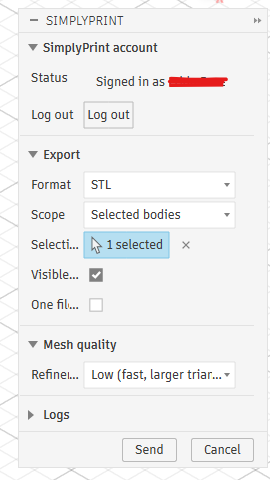
The add-in adds a SimplyPrint button to Fusion's UTILITIES panel (and next to the built-in 3D Print button on the MAKE panel). Pick STL or 3MF, choose what to export, tweak the mesh quality, hit Send, and SimplyPrint opens in your browser with the model loaded - ready to slice, queue, or print.
Get the add-in from the Autodesk App Store:
Get it on the Autodesk App StoreClose Fusion 360, then run the downloaded installer - it drops the add-in straight into Fusion's AddIns folder on Windows or macOS.
Open Fusion 360, press Shift+S, and open the Add-Ins tab.
Select SimplyPrintExport, click Run, and tick Run on Startup so it loads automatically next time.
Click the SimplyPrint button on the UTILITIES panel (or next to the 3D Print button on MAKE) to open the dialog. Click Log in the first time - a browser tab opens, you approve the request, and you're set for future sessions. Pick the format, scope, units and mesh quality you want, then hit Send. Your browser opens SimplyPrint with the model uploaded, ready to slice, queue, or print on one or more printers.
安装SimplyPrint加载项
Get it from the Autodesk App Store and run the installer (Windows or macOS). Then in Fusion press Shift+S, open the Add-Ins tab, run SimplyPrintExport and tick Run on Startup.
登录一次
单击UTILITIES面板中的SimplyPrint按钮,然后选择登录。浏览器会打开一个新选项卡,批准请求后,系统会记住会话以供下次使用。
发送模型并打印
选择STL或3MF,再选择要导出的内容和网格质量,然后点击“发送”。SimplyPrint会在浏览器中打开并加载模型,供您切片、加入队列或打印。
安装适用于Fusion 360的SimplyPrint加载项,然后单击SimplyPrint按钮,将模型导出为STL或3MF并发送。模型会在浏览器中的SimplyPrint内打开,可直接切片、加入队列或打印,无需手动导出或使用SD卡。
是。此插件可免费安装和使用,SimplyPrint 免费套餐还允许您连接一台打印机并进行无线打印。
Yes. The add-in runs on both Windows and macOS - install it from the Autodesk App Store on either platform.
两者均可。STL是通用网格格式,3MF则可保留单位和颜色。发送前,您可以选择格式、实体或组件范围以及网格质量。
是。模型进入 SimplyPrint 后,您可以为其切片,并在账户中的任何打印机上打印,涵盖通过 OctoPrint、Klipper 或内置集成连接的 140 多个品牌和 600 多种型号。
SimplyPrint的集成功能让应用可与您的3D打印机交互,您的3D打印机也可与其他应用交互。这带来无限可能,我们坚信您的3D打印机应能作为IOT设备,与您能想到的所有应用协同工作!
这正是SimplyPrint团队致力于为最受欢迎的平台、切片软件和应用程序提供官方集成的原因,同时也允许用户通过我们的API创建自定义集成,或允许经批准的第三方供应商使用“使用SimplyPrint登录”方式(使用“OAuth2”方法)创建供所有SimplyPrint用户使用的集成。
如果您是开发者且有兴趣为SimplyPrint创建集成,请阅读我们关于此主题的文档。
如果您本人不是开发者,但希望看到特定应用的集成,请查看它是否已列入我们的路线图或建议列表;如果没有,欢迎您提出建议!